A tempo-synced dub delay & reverb plugin built for warm, filthy, self-oscillating repeats.
VST3 / AU · macOS & Windows
Latest version v1.0.80 · macOS (Universal: Apple Silicon + Intel) & Windows (x64)
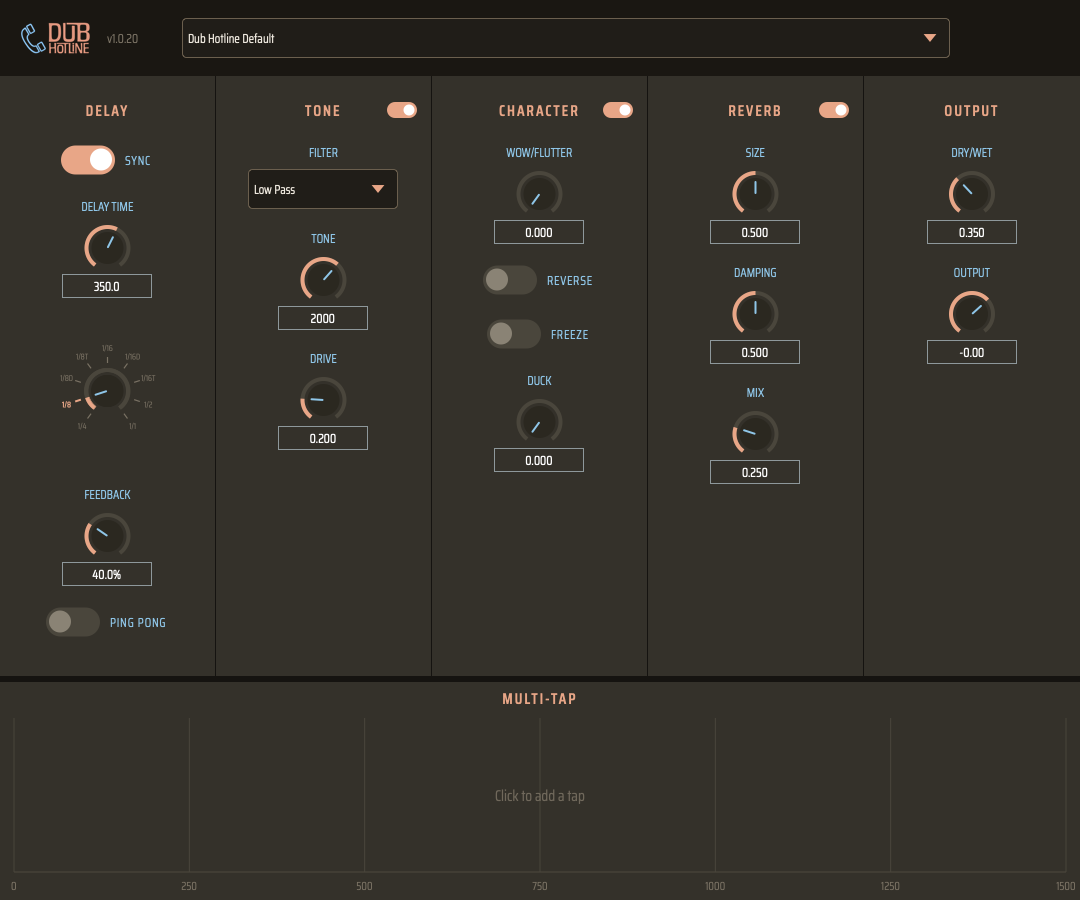
Free-running or host-synced, from tight slapback to a runaway, self-oscillating dub siren — feedback runs up to 110%.
A darkening filter (Low/High/Band Pass/Notch) and tape-style saturation live inside the feedback loop, so repeats warm up and darken the way real tape delays do.
Drag to place up to 8 independent echoes on a timeline. Horizontal for time, vertical for level, Shift+drag for pan.
Tape-wobble modulation, reversed-grain playback, and an infinite buffer freeze for texture and sound design.
A lush reverb tail on the delay signal, with independent size, damping, and mix controls.
Instantly A/B the Tone, Character, and Reverb stages without losing your settings underneath.
From subtle slapback to full dub sound-system wash, each with its own tap pattern, plus one-click saving for your own templates.
Cross-feed stereo bouncing and dry-signal-triggered ducking round out the mix.
Dub Hotline.vst3 to ~/Library/Audio/Plug-Ins/VST3.Dub Hotline.component to ~/Library/Audio/Plug-Ins/Components.Gatekeeper may flag the build on first launch since it isn't notarized — right-click each file and choose Open, or run xattr -d com.apple.quarantine on it.
Dub Hotline.vst3 folder to C:\Program Files\Common Files\VST3.These are the standard install locations, but your DAW may be configured to scan a different plugin folder — check its VST3/AU path settings if Dub Hotline doesn't show up after rescanning.